Accordion
Let users show and hide sections of related content on a page.
Props
false.
small.
none.
left.
Events
Slots
dl.accordion-example {
  margin: 0 0;
}
.accordion-example dt {
  color: var(--goa-color-text-default);
  font: var(--goa-typography-heading-s);
  margin-bottom: var(--goa-space-xs);
}
.accordion-example dd {
  margin: 0 0 var(--goa-space-l);
  font: var(--goa-typography-body-m);
}
.accordion-example dd:last-of-type {
  margin-bottom: 0;
}
<GoabText tag="h3" mt="none" mb="m">
Review your application
</GoabText>
<GoabAccordion
heading="Referral details"
headingContent={<GoabBadge type="important" content="Updated" />}
>
<dl className="accordion-example">
<dt>Date of referral</dt>
<dd>January 27, 2021</dd>
<dt>Work safety concerns</dt>
<dd>None</dd>
<dt>Type of referral</dt>
<dd>Word of mouth, internet search</dd>
<dt>Intake received from another site</dt>
<dd>Yes</dd>
</dl>
</GoabAccordion>
<GoabAccordion heading="Contact information">
<dl className="accordion-example">
<dt>Name</dt>
<dd>Joan Smith</dd>
<dt>Contact preference</dt>
<dd>Text message</dd>
</dl>
</GoabAccordion>// No logic required for this static example<goab-text tag="h3" mt="none" mb="m">Review your application</goab-text>
<goab-accordion heading="Referral details" [headingContent]="importantBadge">
<ng-template #importantBadge>
<goab-badge type="important" content="Updated"></goab-badge>
</ng-template>
<dl class="accordion-example">
<dt>Date of referral</dt>
<dd>January 27, 2021</dd>
<dt>Work safety concerns</dt>
<dd>None</dd>
<dt>Type of referral</dt>
<dd>Word of mouth, internet search</dd>
<dt>Intake received from another site</dt>
<dd>Yes</dd>
</dl>
</goab-accordion>
<goab-accordion heading="Contact information">
<dl class="accordion-example">
<dt>Name</dt>
<dd>Joan Smith</dd>
<dt>Contact preference</dt>
<dd>Text message</dd>
</dl>
</goab-accordion>dl.accordion-example {
margin: 0 0;
}
.accordion-example dt {
color: var(--goa-color-text-default);
font: var(--goa-typography-heading-s);
margin-bottom: var(--goa-space-xs);
}
.accordion-example dd {
margin: 0 0 var(--goa-space-l);
font: var(--goa-typography-body-m);
}
.accordion-example dd:last-of-type {
margin-bottom: 0;
}<goa-text as="h3" mt="none" mb="m">Review your application</goa-text>
<goa-accordion heading="Referral details">
<goa-badge
version="2"
slot="headingcontent"
type="important"
content="Updated"
></goa-badge>
<dl class="accordion-example">
<dt>Date of referral</dt>
<dd>January 27, 2021</dd>
<dt>Work safety concerns</dt>
<dd>None</dd>
<dt>Type of referral</dt>
<dd>Word of mouth, internet search</dd>
<dt>Intake received from another site</dt>
<dd>Yes</dd>
</dl>
</goa-accordion>
<goa-accordion heading="Contact information">
<dl class="accordion-example">
<dt>Name</dt>
<dd>Joan Smith</dd>
<dt>Contact preference</dt>
<dd>Text message</dd>
</dl>
</goa-accordion>const [expandedAll, setExpandedAll] = useState<boolean>(false);
const [expandedList, setExpandedList] = useState<number[]>([]);
useEffect(() => {
setExpandedAll(expandedList.length === 4);
}, [expandedList.length]);
const expandOrCollapseAll = () => {
setExpandedAll((prev) => {
const newState = !prev;
setExpandedList(newState ? [1, 2, 3, 4] : []);
return newState;
});
};
const updateAccordion = (order: number, isOpen: boolean) => {
setExpandedList((prev) => {
if (isOpen) {
return prev.includes(order) ? prev : [...prev, order];
}
return prev.filter((item) => item !== order);
});
};<GoabButton
type="tertiary"
size="compact"
mb="m"
onClick={() => expandOrCollapseAll()}
>
{expandedAll ? "Hide all sections" : "Show all sections"}
</GoabButton>
<GoabAccordion
open={expandedList.includes(1)}
heading="How do I create an account?"
headingSize="medium"
onChange={(open) => updateAccordion(1, open)}
>
To create an account you will need to contact your office admin.
</GoabAccordion>
<GoabAccordion
open={expandedList.includes(2)}
heading="What verification is needed to sign documents digitally?"
headingSize="medium"
onChange={(open) => updateAccordion(2, open)}
>
You will need to verify your identity through our two factor authentication in
addition to the digital signature.
</GoabAccordion>
<GoabAccordion
open={expandedList.includes(3)}
heading="Can I track the status of my service requests online?"
headingSize="medium"
onChange={(open) => updateAccordion(3, open)}
>
Yes, you can see the status of your application on the main service dashboard when
you login. You will receive updates and notifications in your email as your
request progresses.
</GoabAccordion>
<GoabAccordion
open={expandedList.includes(4)}
heading="Are there accessibility features for people with disabilities?"
headingSize="medium"
onChange={(open) => updateAccordion(4, open)}
>
Yes, our digital service is designed with accessibility in mind.{" "}
<a href="#">More information on accessibility.</a>
</GoabAccordion>expandedList: boolean[] = [false, false, false, false];
expandedAll = false;
accordionStatus = "Show all sections";
toggleAccordion(index: number, open: boolean): void {
this.expandedList[index] = open;
this.updateAccordionStatus();
}
onClick(): void {
const isExpanding = this.expandedList.some((isOpen) => !isOpen);
this.expandedList = this.expandedList.map(() => isExpanding);
this.updateAccordionStatus();
}
private updateAccordionStatus(): void {
this.expandedAll = this.expandedList.every((isOpen) => isOpen);
this.accordionStatus = this.expandedList.every((isOpen) => isOpen)
? "Hide all sections"
: "Show all sections";
}<goab-button type="tertiary" size="compact" mb="m" (onClick)="onClick()">
{{ accordionStatus }}
</goab-button>
<goab-accordion
heading="How do I create an account?"
headingSize="medium"
[open]="expandedList[0]"
(onChange)="toggleAccordion(0, $event)"
>
To create an account you will need to contact your office admin.
</goab-accordion>
<goab-accordion
heading="What verification is needed to sign documents digitally?"
headingSize="medium"
[open]="expandedList[1]"
(onChange)="toggleAccordion(1, $event)"
>
You will need to verify your identity through our two factor authentication in addition
to the digital signature.
</goab-accordion>
<goab-accordion
heading="Can I track the status of my service requests online?"
headingSize="medium"
[open]="expandedList[2]"
(onChange)="toggleAccordion(2, $event)"
>
Yes, you can see the status of your application on the main service dashboard when you
login. You will receive updates and notifications in your email as your request
progresses.
</goab-accordion>
<goab-accordion
heading="Are there accessibility features for people with disabilities?"
headingSize="medium"
[open]="expandedList[3]"
(onChange)="toggleAccordion(3, $event)"
>
Yes, our digital service is designed with accessibility in mind.
<a href="#">More information on accessibility.</a>
</goab-accordion>const expandedList = [false, false, false, false];
const toggleBtn = document.getElementById("toggle-all-btn");
const accordions = [
document.getElementById("accordion-1"),
document.getElementById("accordion-2"),
document.getElementById("accordion-3"),
document.getElementById("accordion-4"),
];
function updateButtonText() {
const allExpanded = expandedList.every((isOpen) => isOpen);
toggleBtn.textContent = allExpanded ? "Hide all sections" : "Show all sections";
}
accordions.forEach((accordion, index) => {
accordion.addEventListener("_change", (e) => {
expandedList[index] = e.detail.open;
updateButtonText();
});
});
toggleBtn.addEventListener("_click", () => {
const isExpanding = expandedList.some((isOpen) => !isOpen);
expandedList.fill(isExpanding);
accordions.forEach((accordion) => {
accordion.setAttribute("open", isExpanding);
});
updateButtonText();
});<goa-button version="2" type="tertiary" size="compact" mb="m" id="toggle-all-btn">
Show all sections
</goa-button>
<goa-accordion
id="accordion-1"
heading="How do I create an account?"
heading-size="medium"
>
To create an account you will need to contact your office admin.
</goa-accordion>
<goa-accordion
id="accordion-2"
heading="What verification is needed to sign documents digitally?"
heading-size="medium"
>
You will need to verify your identity through our two factor authentication in addition
to the digital signature.
</goa-accordion>
<goa-accordion
id="accordion-3"
heading="Can I track the status of my service requests online?"
heading-size="medium"
>
Yes, you can see the status of your application on the main service dashboard when you
login. You will receive updates and notifications in your email as your request
progresses.
</goa-accordion>
<goa-accordion
id="accordion-4"
heading="Are there accessibility features for people with disabilities?"
heading-size="medium"
>
Yes, our digital service is designed with accessibility in mind.
<a href="#">More information on accessibility.</a>
</goa-accordion>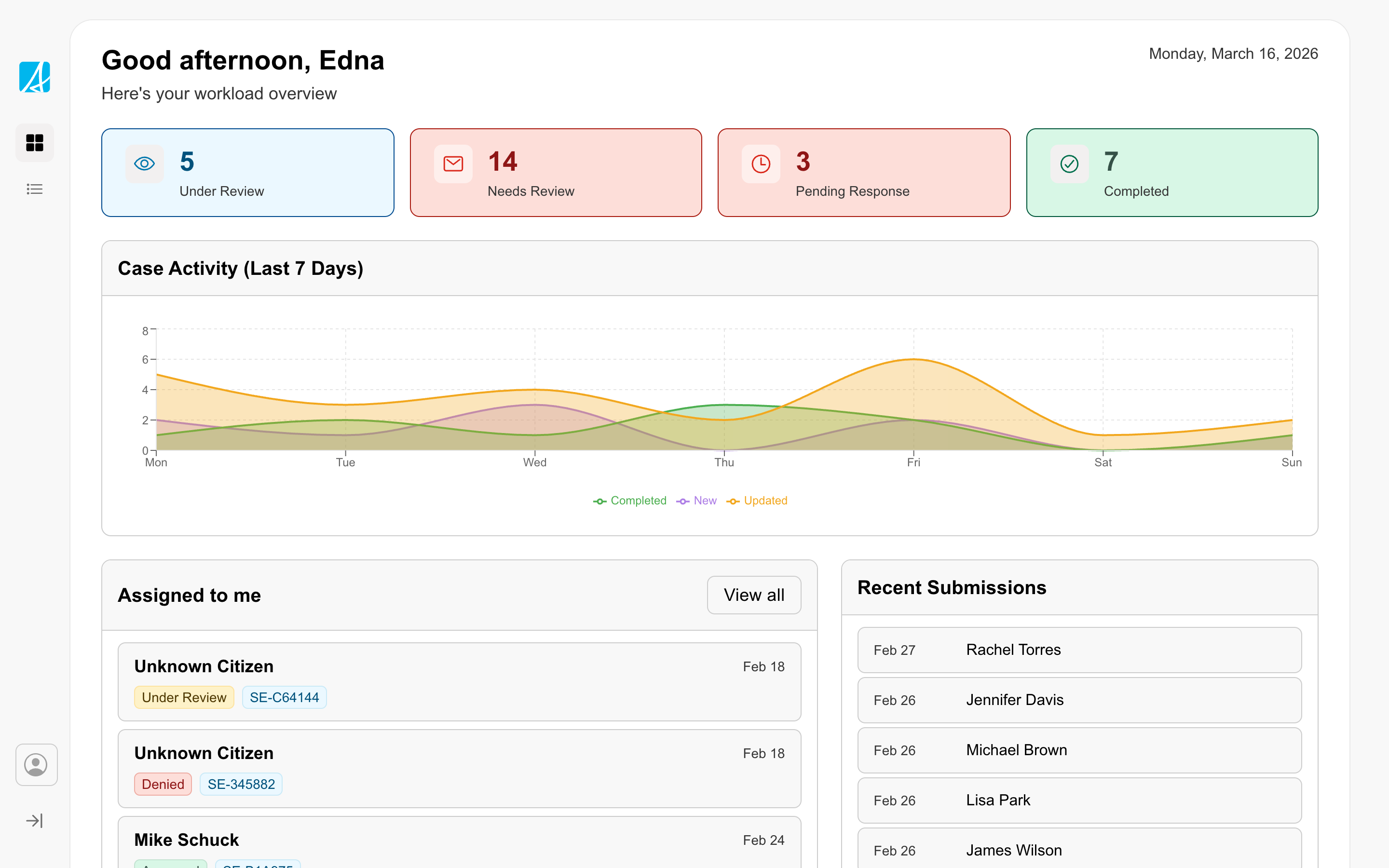
The workspace is for productivity-focused services used by service delivery staff as a daily tool to review information, manage records, and complete tasks. The design prioritizes productivity, efficiency, and accuracy so staff can move through their work quickly while ensuring the best outcome for citizens and government.
Workspaces should be adapted to fit each service's context and user needs. The reference example is a starting point to expand on, not a rigid template.
Positioning
Enter your full legal name as it appears on your government-issued ID.
Other
Content
Content here
Lorem ipsum dolor sit amet consectetur. Felis mauris in interdum congue amet curabitur diam enim. Sem nec ut sed tristique mauris nibh ac.